
red750
-
Posts
15,049 -
Joined
-
Last visited
-
Days Won
702






red750's Achievements






-
https://www.facebook.com/reel/29130341663283120
-
My fault I know, but this is thread drift. I have started a new thread to continue the topic.
-
Many of the adopted children have gaps in their history as they grow older. Did they love me? Why was I given away? Was I not wanted? What happened to my birth parents? Were they married? Was I the result of a one-night stand? Are they still alive? Did I have any siblings or half-siblings? It's very hard for someone to discover that their parents were married and they had older and younger siblings. Why would parents give away a middle child? The reasons for giving up a child are many. The mother may only have been 15 or 16 and too young to care for a child. Casual relationships that broke up, with no support for the child. Strict parents not wanting the shame. Religious attitudes to unmarried mothers. Mixed races or religions (Catholic and Protestant in Ireland). Relationships with foreign servicemen reposted to their home country. Even for married couples, if the father is out of work or in prison. And the list goes on. Another consideration is genetic disorders passed from generation to generation. There was a couple who had to surrender their child because they couldn't afford to feed themselves, let alone a baby. They stayed married for a couple of years, then divorced. The father suffered a heart condition and then discovered it was a genetic disorder. The race was on to locate the son. The parents searched together, through the program, and located the son. He was tested and found he had the disorder. He was only months away from a heart attack, but was treated in time and saved. Mothers forced to give up their child `through parental pressure, social stigma or economic circumstances pine for their lost child for the rest of their lives, wanting to know if they had a good life, loving adoptive parents, and have made good as they grew up.
-
I have seen lots of stories like this, as I am kind of addicted to a program called Long Lost Family. It is an English program that has run for a number of years, but there is an American version, and there was an Australian version for one season. The program acts on behalf of people who were adopted at birth or an early age, or parents forced to give up their children, but have wanted to find out that they have a good life. In the UK in the 50's, 60's and 70's, having a child out of wedlock was a family disgrace, and many parents refused to have their illegitimate grandchild brought up in the family, putting the mother in a mother and baby home till the child was born, then having it adopted. Often these adopted babies grew up to be adults who looked nothing like their adoptive parents or siblings, and wondering where they came from. The program uses DNA databases and special intermediaries to trace their parents because the details of adopted children were usually changed and protected. It is very emotional when an adoptee is reunited with their birth mother or father, or when birth siblings who did not know about each other finally meet. Family is often located in other parts of the world. The most difficult ones are foundlings, who were dumped by their mother on doorsteps, phone boxes, even railway luggage racks. They have no record of where or when they were born, just a baby in a cardboard box or shopping bag. The program airs on Channel 2 and is available on ABC Iview.
-
Family background from Wikipedia: Anthony Norman Albanese was born on 2 March 1963 at St Margaret's Hospital in the Sydney suburb of Darlinghurst.[7][8] He is the son of Carlo Albanese and Maryanne Ellery[9] (1936–2002).[10][11] His mother was Australian, while his father was from Barletta in Italy. They met in March 1962 on a passenger ship from Sydney to Southampton, England, where his father was working as a steward. After she fell pregnant, he told her he was engaged to a woman in Italy and could not marry her. His mother returned to Sydney in October 1962 and the two did not remain in contact.[12][13][14] Albanese's mother adopted Carlo's surname, and named Anthony after his cousin Anthony Howett, who had died in a car accident four years earlier. References: [7] "Hon Anthony Albanese MP". Senators and Members of the Parliament of Australia. Retrieved 11 November 2021. [8]Middleton 2016, p. 27. [9]Mcguirk, Rod (20 May 2022). "Australia's would-be PM Albanese shaped by humble start". ABC News. Archived from the original on 1 June 2022. Retrieved 2 June 2022. [10]Albanese, Anthony (31 March 2014). "Lessons for Millers Point from Anthony Albanese's mother". The Sydney Morning Herald. Archived from the original on 1 July 2022. Retrieved 5 May 2025. [11]"Anthony Albanese posts heartbreaking Mother's Day story". news.com.au. 8 May 2002. Archived from the original on 12 June 2022. Retrieved 24 May 2022. [12]"Book Extract From Albanese: Telling It Straight By Karen Middleton". 21 August 2016. Archived from the original on 12 June 2022. Retrieved 4 February 2022. This story appeared in the Weekend Australian Magazine, 20–21 August 2016. [13] "Anthony Albanese's long-held family secret". ABC News. 23 August 2016. Archived from the original on 19 July 2018. Retrieved 20 October 2017. [14] "The long way back". The Australian. August 2016. Archived from the original on 15 December 2019. Retrieved 20 October 2017.
-

Let's talk about Artificial Intelligence
red750 replied to old man emu's topic in Science and Technology
Staff culled to be replaced by AI or offshore should be paid 12 months salary on termination. The banks are making record profits, as are many other employers going down this path. When I was retrenched from Westpac, it was computerisation in branches which resulted in the closure of the processing centre I managed. Jobs were near impossible to find as other banks were doing likewise at the same time. One branch manager from my district who was retrenched because his branch was closed (the CBAL/BNSW merger resulted in two branches in the one suburb), spent all his money at the RSL, drinking himself to death. -
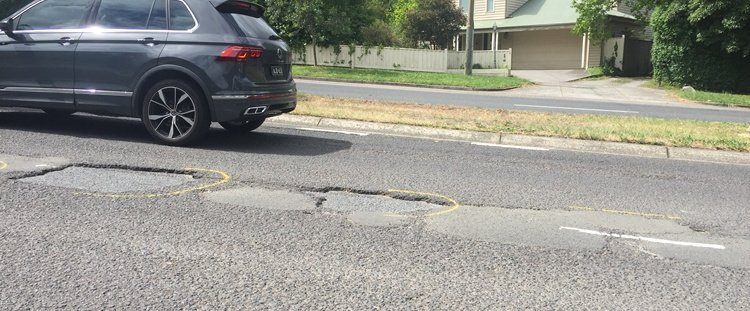
How they fix potholes in our neck of the woods. Bitumen in the hole, but not level with the road. A bit of rain and they will fill with water and crumble again.

-
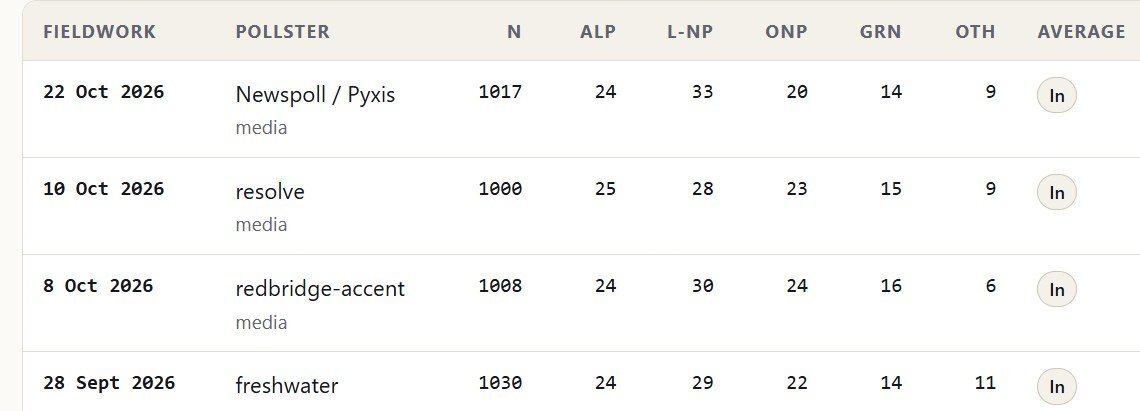
Here is a summary of a number of polls taken over the last month or so, pollsters named. Click to enlarge.
-
I see the latest poll has Coalition at 33$, Labor at 24% and ON at 20%. Two party preferred has the Coalition with a lead over Labor of 55-45.
-
Nev, you are as welded on as Maggots are to Trump.
-
It's an English show, so I'm guessing Union. The preceding sentence to the quote was "30 men constantly crashing into each other." It was said while the police were investigating the death of a player. Personally, I don't know much about either, and I don't really enjoy watching it.
-
-
Why do the English pronounce the U sound (as in cut, gut, etc.) like 'oo' in book? Mum become "Moom", run becomes "roon", sun becomes "soon", even come becomes "coom".
-
A credit to Epstein. He got a lot of people reading.